
首页
关于
友链
便签
统计
Search
1
QQ闪照如何查看 2022.7.29
398 阅读
2
Cloudreve挂载本机存储目录
343 阅读
3
Debian10 升级内核5.10
323 阅读
4
docker映射端口部署wikihost Looking-glass Server (ALS)
225 阅读
5
使用Docker部署HTML5 - Speedtest
163 阅读
默认分类
服务器
生活有感
哲思
诗词
AI
Linux
MySQL
Photoshop
Web建站
Cloudreve
Typecho
编程
Java
登录
Search
标签搜索
Linux
windows
web建站
win10
nginx
五哲
debian
docker
vps
CF
iptables
端口
apt
yum
java
自动更新
jia
HTML
内核
CF Workers
史沛思
累计撰写
66
篇文章
累计收到
54
条评论
首页
栏目
默认分类
服务器
生活有感
哲思
诗词
AI
Linux
MySQL
Photoshop
Web建站
Cloudreve
Typecho
编程
Java
页面
关于
友链
便签
统计
搜索到
7
篇与
的结果
2024-01-29
Win10安装Apple Music Preview
暂无简介
2024年01月29日
18 阅读
0 评论
0 点赞
2023-10-21
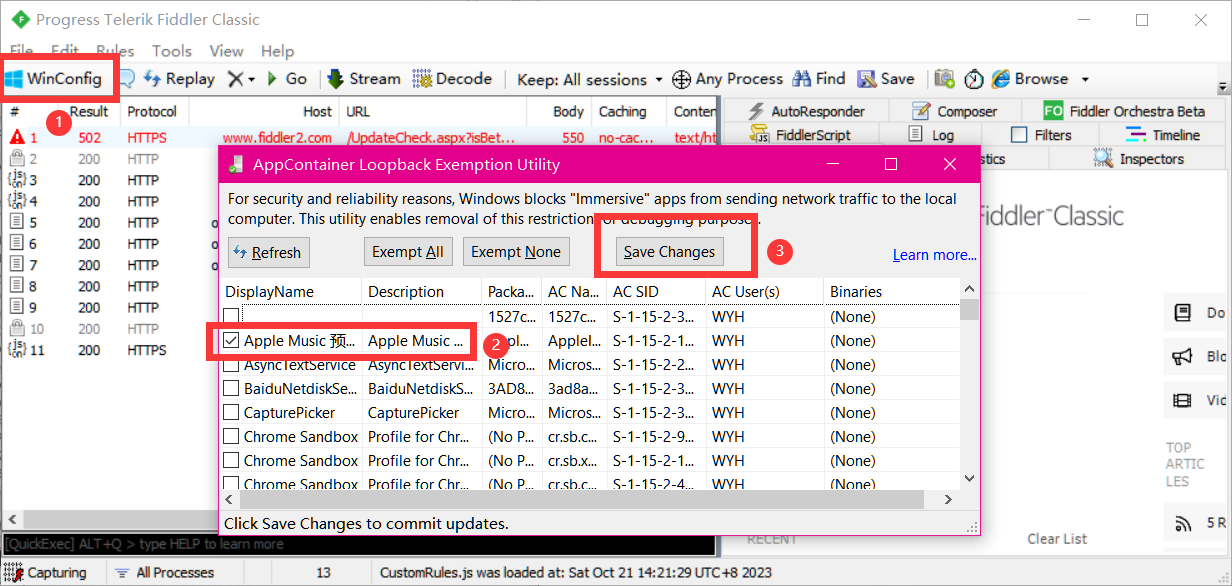
解决Win10 UWP应用无法联网
下载安装 Fiddler 应用 按照如图所示操作 下载fiddler
2023年10月21日
31 阅读
0 评论
0 点赞
2023-10-20
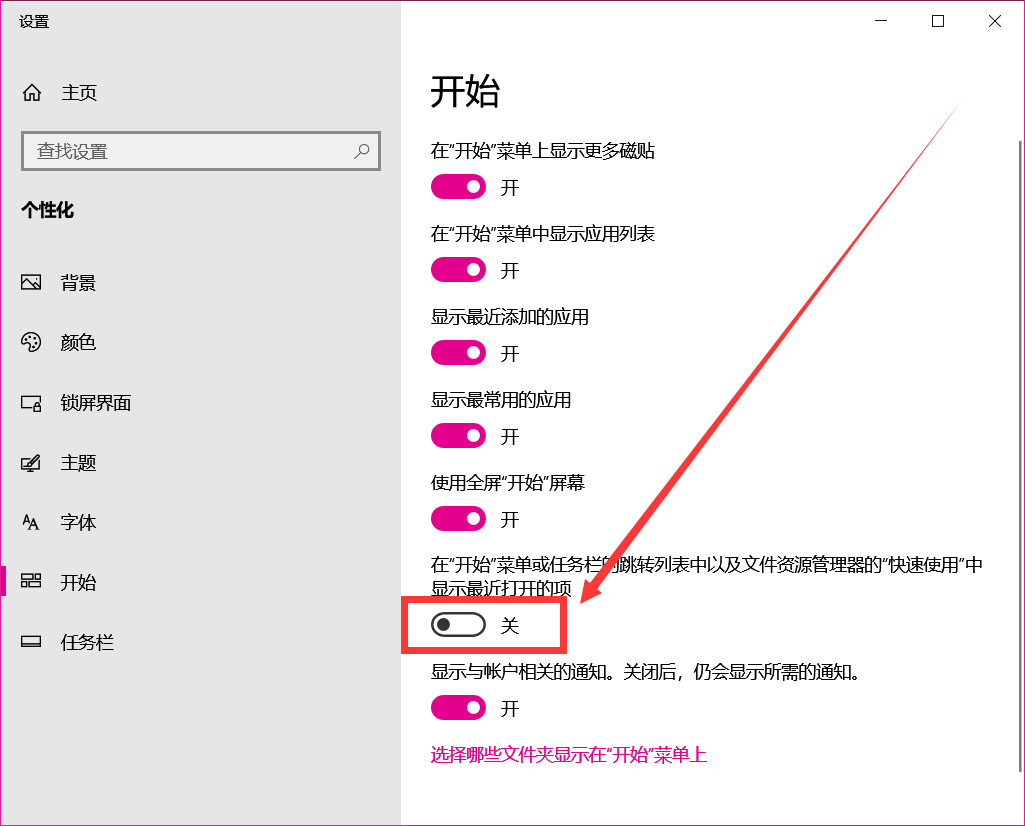
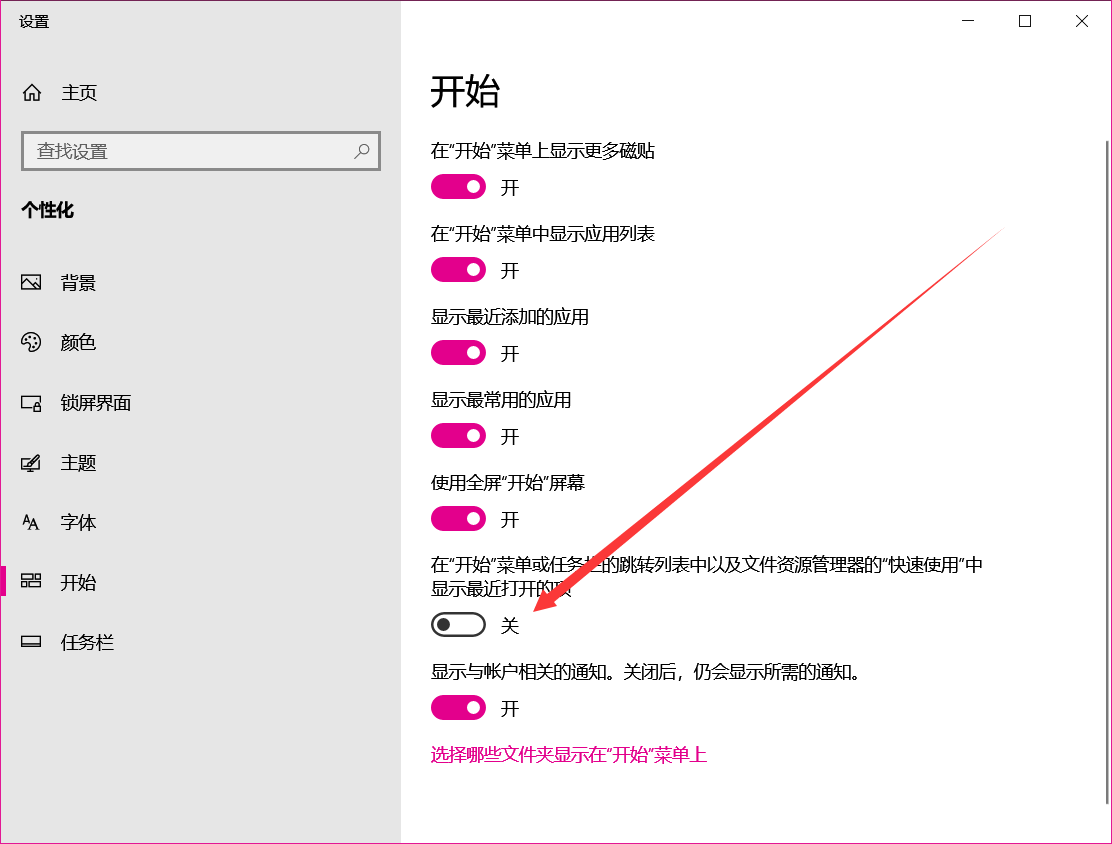
Win10资源管理器卡死的解决办法
在桌面右键个性化,找到开始,关闭下图选项,亲测有效
2023年10月20日
12 阅读
0 评论
0 点赞
2023-09-26
WSL的使用与基础命令
一、安装WSL和Debian并切换至WSL2在“启用或关闭Windows功能”中启用以下两个选项:Windows虚拟机平台、适用于Linux的Windows子系统。在Windows应用商店中选择需要安装的Linux发行版。(我选择Debian)打开Debian,完成安装。(先安装Linux再转换WSL2)在PowerShell中运行以下指令,将WSL1转换成WSL2。wsl --set-version Debian 2 wsl --set-default-version 2二、执行默认配置并安装ca-certificatesapt-get update apt-get install ca-certificates三、切换默认源为清华镜像源编辑文件vim /etc/apt/sources.list清华源deb [trusted=yes] https://mirrors.tuna.tsinghua.edu.cn/debian/ buster main contrib non-free # deb-src [trusted=yes] https://mirrors.tuna.tsinghua.edu.cn/debian/ buster main contrib non-free deb [trusted=yes] https://mirrors.tuna.tsinghua.edu.cn/debian/ buster-updates main contrib non-free #deb-src [trusted=yes] https://mirrors.tuna.tsinghua.edu.cn/debian/ buster-updates main contrib non-free deb [trusted=yes] https://mirrors.tuna.tsinghua.edu.cn/debian/ buster-backports main contrib non-free # deb-src [trusted=yes] https://mirrors.tuna.tsinghua.edu.cn/debian/ buster-backports main contrib non-free deb [trusted=yes] https://mirrors.tuna.tsinghua.edu.cn/debian-security buster/updates main contrib non-free # deb-src [trusted=yes] https://mirrors.tuna.tsinghua.edu.cn/debian-security buster/updates main contrib non-free四、替换完整版vim编辑器apt-get remove vim-common apt-get install vim查看wsl版本、wsl -l -v查看已安装的wslwsl --list卸载已安装的wslwsl --unregister Debian查看可安装的wslwsl --list --online
2023年09月26日
39 阅读
0 评论
0 点赞
2023-09-24
文件管理快速加载脚本
运用Windows 特性 bug所写的一个文件管理器快速加载脚本Set WshShell = WScript.CreateObject("WScript.Shell") WshShell.Run "C:\Windows\explorer.exe" Wscript.Sleep 700 wshShell.SendKeys "{F11}" Wscript.Sleep 500 wshShell.SendKeys "{F11}"保存后缀为.vbs即可
2023年09月24日
9 阅读
0 评论
0 点赞
2022-11-11
Windows 操作
添加环境变量setx /m PATH "C:\ffmpeg\bin;%PATH%" 重启桌面taskkill /f /im explorer.exe start explorer.exe文件管理器卡死关闭这个功能,或者重启explore.exe 右键菜单变宽可能是PyCharm或者AMD Software名称过长导致的,进入注册表删除或者使用火绒工具箱禁用就好了HKEY_CLASSES_ROOT\Directory\Background\shell\PyCharm
2022年11月11日
56 阅读
0 评论
0 点赞
2022-11-11
Windows10 ltsc 2019 关闭自动更新
打开计算机管理→服务和应用程序→服务找到“Windows Update”双击打开属性,默认的是更新方式是手动或自动,我们要禁止更新就需要将启动类型更改为“禁用”后点击应用确定,这样就关闭了自动更新。::(捂嘴笑)
2022年11月11日
33 阅读
2 评论
0 点赞