
搜索到
32
篇与
的结果
-
 HTML爱心代码 <!doctype html> <html> <head> <meta charset="utf-8"> <title>canvas爱心</title> <style> html, body { height: 100%; padding: 0; margin: 0; background: #000; } canvas { position: absolute; width: 100%; height: 100%; }</style> </head> <body> <canvas id="pinkboard"></canvas> <script> /* * Settings */ var settings = { particles: { length: 500, // maximum amount of particles duration: 2, // particle duration in sec velocity: 100, // particle velocity in pixels/sec effect: -0.75, // play with this for a nice effect size: 30, // particle size in pixels }, }; /* * RequestAnimationFrame polyfill by Erik M?ller */ (function(){var b=0;var c=["ms","moz","webkit","o"];for(var a=0;a<c.length&&!window.requestAnimationFrame;++a){window.requestAnimationFrame=window[c[a]+"RequestAnimationFrame"];window.cancelAnimationFrame=window[c[a]+"CancelAnimationFrame"]||window[c[a]+"CancelRequestAnimationFrame"]}if(!window.requestAnimationFrame){window.requestAnimationFrame=function(h,e){var d=new Date().getTime();var f=Math.max(0,16-(d-b));var g=window.setTimeout(function(){h(d+f)},f);b=d+f;return g}}if(!window.cancelAnimationFrame){window.cancelAnimationFrame=function(d){clearTimeout(d)}}}()); /* * Point class */ var Point = (function() { function Point(x, y) { this.x = (typeof x !== 'undefined') ? x : 0; this.y = (typeof y !== 'undefined') ? y : 0; } Point.prototype.clone = function() { return new Point(this.x, this.y); }; Point.prototype.length = function(length) { if (typeof length == 'undefined') return Math.sqrt(this.x * this.x + this.y * this.y); this.normalize(); this.x *= length; this.y *= length; return this; }; Point.prototype.normalize = function() { var length = this.length(); this.x /= length; this.y /= length; return this; }; return Point; })(); /* * Particle class */ var Particle = (function() { function Particle() { this.position = new Point(); this.velocity = new Point(); this.acceleration = new Point(); this.age = 0; } Particle.prototype.initialize = function(x, y, dx, dy) { this.position.x = x; this.position.y = y; this.velocity.x = dx; this.velocity.y = dy; this.acceleration.x = dx * settings.particles.effect; this.acceleration.y = dy * settings.particles.effect; this.age = 0; }; Particle.prototype.update = function(deltaTime) { this.position.x += this.velocity.x * deltaTime; this.position.y += this.velocity.y * deltaTime; this.velocity.x += this.acceleration.x * deltaTime; this.velocity.y += this.acceleration.y * deltaTime; this.age += deltaTime; }; Particle.prototype.draw = function(context, image) { function ease(t) { return (--t) * t * t + 1; } var size = image.width * ease(this.age / settings.particles.duration); context.globalAlpha = 1 - this.age / settings.particles.duration; context.drawImage(image, this.position.x - size / 2, this.position.y - size / 2, size, size); }; return Particle; })(); /* * ParticlePool class */ var ParticlePool = (function() { var particles, firstActive = 0, firstFree = 0, duration = settings.particles.duration; function ParticlePool(length) { // create and populate particle pool particles = new Array(length); for (var i = 0; i < particles.length; i++) particles[i] = new Particle(); } ParticlePool.prototype.add = function(x, y, dx, dy) { particles[firstFree].initialize(x, y, dx, dy); // handle circular queue firstFree++; if (firstFree == particles.length) firstFree = 0; if (firstActive == firstFree ) firstActive++; if (firstActive == particles.length) firstActive = 0; }; ParticlePool.prototype.update = function(deltaTime) { var i; // update active particles if (firstActive < firstFree) { for (i = firstActive; i < firstFree; i++) particles[i].update(deltaTime); } if (firstFree < firstActive) { for (i = firstActive; i < particles.length; i++) particles[i].update(deltaTime); for (i = 0; i < firstFree; i++) particles[i].update(deltaTime); } // remove inactive particles while (particles[firstActive].age >= duration && firstActive != firstFree) { firstActive++; if (firstActive == particles.length) firstActive = 0; } }; ParticlePool.prototype.draw = function(context, image) { // draw active particles if (firstActive < firstFree) { for (i = firstActive; i < firstFree; i++) particles[i].draw(context, image); } if (firstFree < firstActive) { for (i = firstActive; i < particles.length; i++) particles[i].draw(context, image); for (i = 0; i < firstFree; i++) particles[i].draw(context, image); } }; return ParticlePool; })(); /* * Putting it all together */ (function(canvas) { var context = canvas.getContext('2d'), particles = new ParticlePool(settings.particles.length), particleRate = settings.particles.length / settings.particles.duration, // particles/sec time; // get point on heart with -PI <= t <= PI function pointOnHeart(t) { return new Point( 160 * Math.pow(Math.sin(t), 3), 130 * Math.cos(t) - 50 * Math.cos(2 * t) - 20 * Math.cos(3 * t) - 10 * Math.cos(4 * t) + 25 ); } // creating the particle image using a dummy canvas var image = (function() { var canvas = document.createElement('canvas'), context = canvas.getContext('2d'); canvas.width = settings.particles.size; canvas.height = settings.particles.size; // helper function to create the path function to(t) { var point = pointOnHeart(t); point.x = settings.particles.size / 2 + point.x * settings.particles.size / 350; point.y = settings.particles.size / 2 - point.y * settings.particles.size / 350; return point; } // create the path context.beginPath(); var t = -Math.PI; var point = to(t); context.moveTo(point.x, point.y); while (t < Math.PI) { t += 0.01; // baby steps! point = to(t); context.lineTo(point.x, point.y); } context.closePath(); // create the fill context.fillStyle = '#ea80b0'; context.fill(); // create the image var image = new Image(); image.src = canvas.toDataURL(); return image; })(); // render that thing! function render() { // next animation frame requestAnimationFrame(render); // update time var newTime = new Date().getTime() / 1000, deltaTime = newTime - (time || newTime); time = newTime; // clear canvas context.clearRect(0, 0, canvas.width, canvas.height); // create new particles var amount = particleRate * deltaTime; for (var i = 0; i < amount; i++) { var pos = pointOnHeart(Math.PI - 2 * Math.PI * Math.random()); var dir = pos.clone().length(settings.particles.velocity); particles.add(canvas.width / 2 + pos.x, canvas.height / 2 - pos.y, dir.x, -dir.y); } // update and draw particles particles.update(deltaTime); particles.draw(context, image); } // handle (re-)sizing of the canvas function onResize() { canvas.width = canvas.clientWidth; canvas.height = canvas.clientHeight; } window.onresize = onResize; // delay rendering bootstrap setTimeout(function() { onResize(); render(); }, 10); })(document.getElementById('pinkboard'));</script> </body> </html>
 -
提高做事的专注力的六种方法 1. 1-3-5 待办清单法则给自己每天要做的事情设限,并排出优先顺序:每天安排1件重要任务,3件中等任务,5件小型琐事,避免瞎忙。2. 番茄工作法每工作25分钟,就休息5分钟,是一个番茄钟;然后,重复四个番茄钟后,就多休息一会儿,例如15分钟~30分钟。”3. 任务切换法消耗了时间和精力,却没什么产出;立即根据任务清单进行下一个任务。4. 延迟满足法在工作学习的过程中,尽量不要让自己开始这些事情,而是设定一个时间,延迟你想玩的冲动。5. 思绪落地法把脑海中冒出来的这个想法写下来,让它落地。准备一个笔记本,放在工作桌旁边,当你在工作、学习时,如果脑袋里蹦出了任何想法,就先把它写到笔记本上,让自己安心回到工作学习中,等任务结束后再去处理或探究。6. 减少干扰法主动的去调整或规避那些(可能)影响你的事物。带耳机,设置手机可用时间,删除色群与娱乐软件。
-
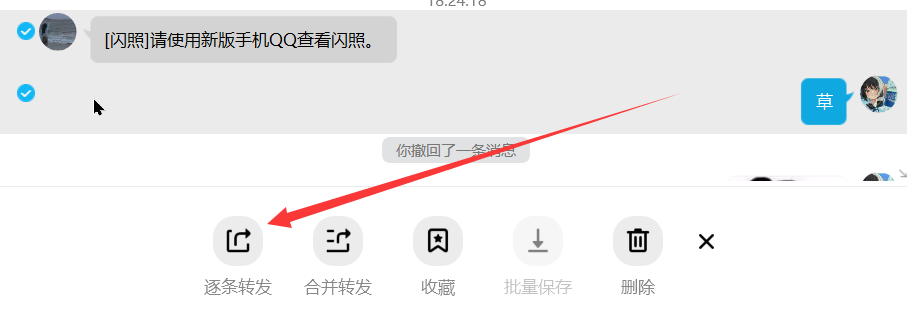
QQ闪照如何查看 2022.7.29 电脑上登录上你的QQ,进入到你需要闪照的聊天界面,同步漫游消息,查看历史消息,找到闪照,电脑上不能查看,点击消息触发多选,选择闪照,逐条转发分享给自己,进入手机QQ,你就会发现又可以看闪照了,而且可以无限制转发看了。闪照转发像这样就可以在手机上查看了**但这个方法治标不治本,我们应该如何保存下来呢?旧版QQ可以通过文件夹找到闪照源文件,更该后缀即可查看闪照。而我最近发现新版QQ()启用了闪照加密,已经无法通过更改后缀名打开保存。根据测试,QQ对于图片加密是在本地的,也就是说,旧版QQ仍然可以通过更改后缀名打开保存闪照。好的我们在旧手机上可以下载一个旧版本QQ登录,再用电脑转发自己QQ上,在文件夹即可找到闪照原图** {cloud title="旧版QQ下载" type="default" url="lpan.cc" password=""/}闪照目录/0/Android/data/com.tencent.mobileqq/Tencent/MobileQQ/chatpic/chatimg/QQ加载闪图但不查看,进入目录按时间排序,最新的就是了,更改后缀即可保存
-
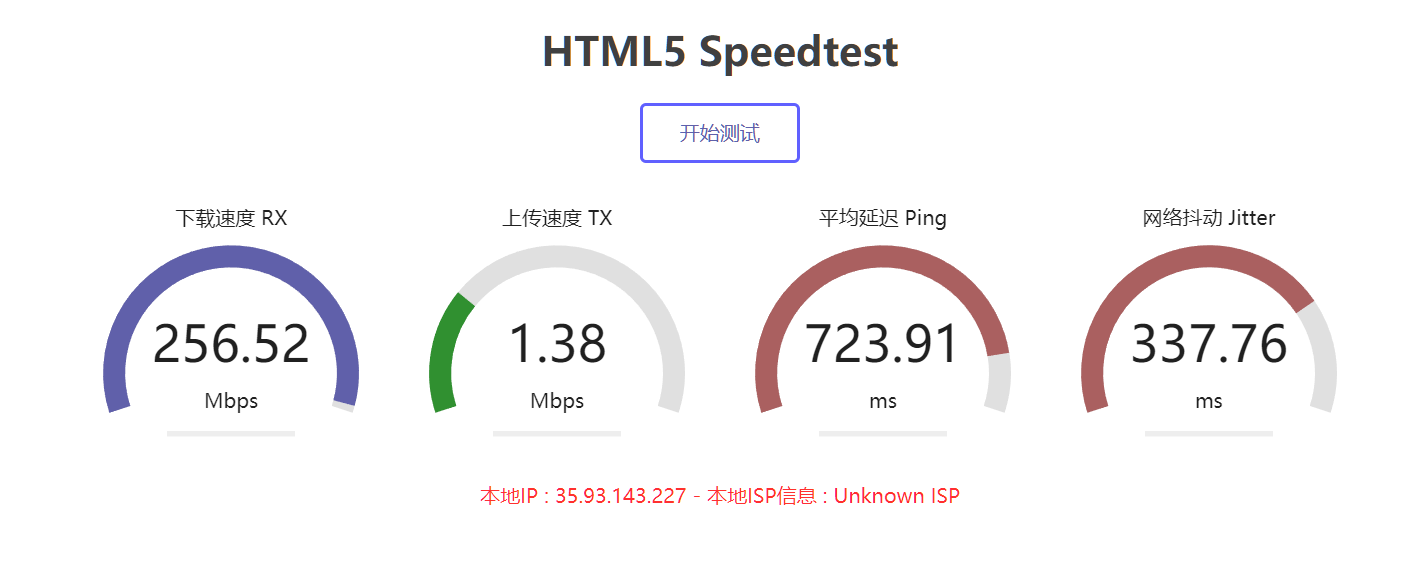
使用Docker部署HTML5 - Speedtest 网页版speedtest虽然好用,却不方便测试服务器到本地的链接? 在vps跑speedtest cli总感觉不靠谱? 现在有了html speedtest 一切都将解决**快速用docker部署吧!** 安装dockercurl -sSL https://get.docker.com/ | sh systemctl start docker systemctl enable docker配置镜像docker run -d -p 6688:80 ilemonrain/html5-speedtest:alpine参数-t:启动后显示日志,可用Ctrl+C转入后台运行 -d:后台模式启动 -p 6688:80:镜像映射端口,修改6688为任意端口即可访问地址http://ip:6688即可.{lamp/}CentOS7关闭防火墙/开启端口#打开6688端口 firewall-cmd --zone=public --add-port=6688/tcp --permanent #关闭防火墙 systemctl stop firewalld.service systemctl disable firewalld.service
-
-
-
-